AI art to vector for posters, shirts and coloring pages
Midjourney gave you a 1024-pixel image and the T-shirt template wants 4500x5400. For flat, graphic AI art, a vector version lets you export whatever size the print needs.
Drop your AI art here
Drag and drop an image, or click to choose a file.
Choose imagePNG, JPG, WEBP, BMP, GIF
The converter opens with the recommended settings below. Open the converter without a file
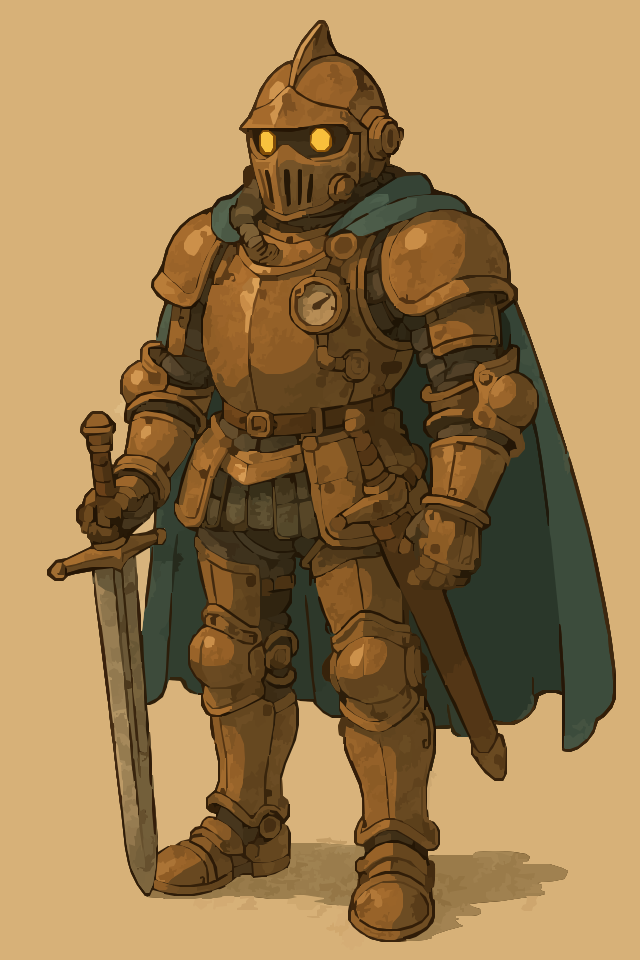
Original raster
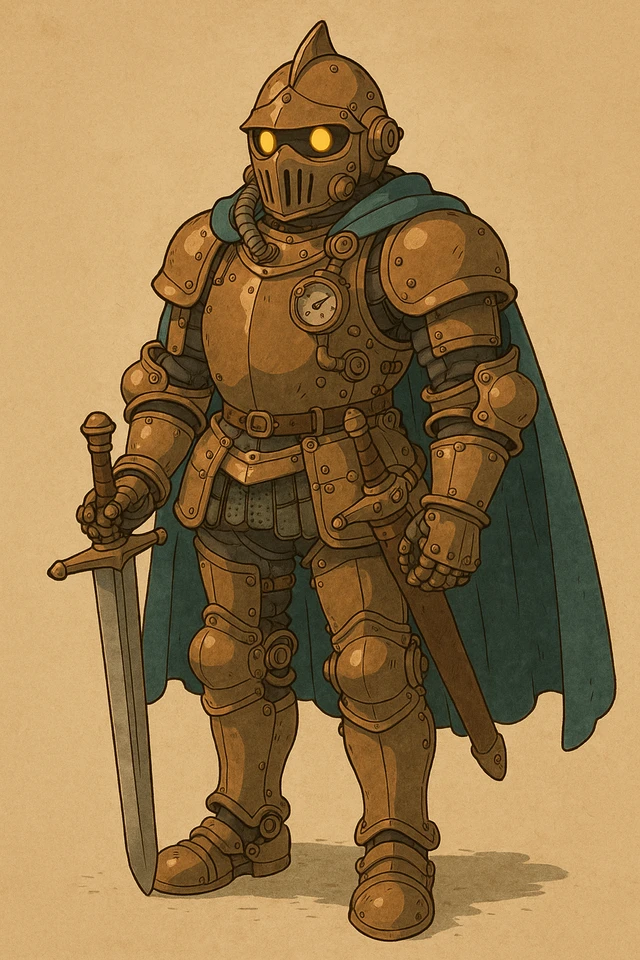
SVGR vector
AI art to vector in five steps
- Pick art that suits tracing. Flat colors, bold shapes and clean outlines trace well. Soft, painterly or photo-like images are better upscaled instead.
- Use the biggest render. If your generator can upscale, do that first. More pixels give cleaner edges.
- Drop it in. Drop the PNG, JPG, WEBP, BMP or GIF (up to 15 MB) above. The Illustration settings below are applied for you.
- Check the preview. Zoom in on faces, fine lines and lettering. Lower Quality for a smaller, simpler file, or raise it for more detail.
- Download, then export. Download the SVG or PDF for one credit. If your print service wants a PNG, export one from the SVG at the exact print size.
Recommended settings
Why AI art runs out of pixels at print size
Most AI images are too small to print large. Midjourney V8.2 renders 1024x1024 by default, its upscalers double that to 2048x2048, and HD images are 2048 pixels and can't be upscaled further. Converting AI art to vector removes that ceiling for flat, graphic artwork, because shapes can be rendered at any size.
A T-shirt print area typically wants about 4500x5400 pixels at 300 DPI, which is 15x18 inches. Even a 2048-pixel image covers less than half of that width.
| Source or destination | Size or format | Note |
|---|---|---|
| Midjourney V8.2 standard | 1024 x 1024 px | Default render |
| Midjourney upscaled or HD | 2048 x 2048 px | HD images can't be upscaled further |
| T-shirt print area | About 4500 x 5400 px | 15 x 18 in at 300 DPI |
| Printful | PNG or JPEG | 150 to 300 DPI |
| Redbubble | JPG or PNG | Upload a raster file |
| Amazon KDP interior | At least 300 DPI | Vector line art stays sharp at any trim size |
Print-on-demand sites want a PNG, so export one from the SVG
Print-on-demand platforms usually ask for a raster upload. Printful's file guidelines call for PNG or JPEG at 150 to 300 DPI, and Redbubble takes JPG or PNG.
The workflow that works: trace flat, sticker or logo-style AI art to SVG, then open the SVG in Inkscape, Illustrator or Affinity Designer and export a PNG at the exact size the product template asks for, such as 4500x5400 for a shirt.
Because that PNG is rendered from shapes, its edges stay crisp at full size instead of being stretched from a small image. That is where converting AI art to vector pays off.
Painterly or photo-like AI art? Use an upscaler instead
Tracing turns an image into flat areas of color. Soft brushwork, skin, fur, fog and photographic lighting have no clean edges, so a trace looks posterized and the file gets very large.
For that kind of picture, an AI image to SVG conversion is the wrong tool. Use an upscaler, such as your generator's own or a dedicated one, to reach print size and keep the painted look.
Good candidates for tracing are stickers, flat illustrations, poster art with bold shapes, icons, patterns and line-art coloring pages. For those, a Midjourney to SVG trace is often the fastest way to a print-size file.
KDP coloring pages
Amazon KDP interiors need images of at least 300 DPI. At that density a 1024-pixel drawing covers only about 3.4 inches, well short of a full page.
A KDP coloring page vector stays sharp at whatever trim size you choose, so you can place it full-page without resampling. Place the SVG or PDF in your layout app and export the interior from there, since SVGR's PDF holds one image sized to that image, not a finished book interior.
For pure black-and-white line art, switch Image type to Line Art, which is built for outlines, and leave Recognize text off unless you want the page's lettering as editable text. Lines become thin filled shapes, so there's no stroke width to adjust afterward.
Keeping file sizes manageable
Detailed AI art contains thousands of small patches of color, and each one becomes a shape, so busy images produce large SVG files.
Lower Quality for bolder shapes and a smaller file, and raise it only if the preview is missing detail you care about.
SVGR has no color-count setting. If you need a set number of colors, for example for screen printing, reduce them in an image editor before uploading, or ask the generator for flat shading and fewer colors.
Honest limits
- Stylized, not identical. With the Illustration type, gradients and soft shading are flattened into areas of solid color.
- Filled shapes, not strokes. Every line becomes a thin filled shape, which suits printing but not pen plotters or single-line drawing.
- Stacked shapes. Enclosed areas sit on top of larger shapes rather than being cut out. If you plan to cut the design on a Cricut or vinyl cutter, use Cricut Slice or Inkscape Path > Difference first.
- Rights. Before selling, check your AI tool's terms of use and your print platform's content rules.
Frequently asked questions
Can I upload an SVG to Printful or Redbubble?
Redbubble takes JPG or PNG, and Printful's guidelines ask for PNG or JPEG at 150 to 300 DPI. Export a PNG at the template size from your SVG and upload that.
How big should my T-shirt file be?
A common target is about 4500x5400 pixels at 300 DPI, which is a 15x18-inch print area. Check your platform's template for its exact size.
Can I convert a Midjourney image to a vector?
Yes, for flat, graphic images. Use the upscaled 2048-pixel version if you have it, and use an upscaler instead for painterly or photographic images.
Does an AI poster to vector conversion look like the original?
Flat, bold poster art comes out close. Soft shading and texture turn into visible areas of color, so check the free preview before you download.
Why is my SVG file so large?
Every small patch of color becomes a shape. Lower Quality, simplify the colors before uploading, or crop to the part you need.
Is vector a good choice for KDP coloring pages?
Yes for line art, because it stays sharp at any trim size and can be exported at 300 DPI or more. Use the Line Art image type for black-and-white outlines.
Will text in my AI art stay editable?
No. Recognize text isn't offered for the Illustration type, so lettering is traced as shapes, exactly as drawn, including any AI spelling mistakes.
Related use cases
Prefer a short walkthrough? Read the tutorial: Convert AI Posters to SVG
Ready to convert?
Converting and previewing are free, with no account needed. Downloading the SVG or PDF uses one credit.